Fixing Developer Path Information Leak in Xcode
Removing /Users/ path strings in Swift programs.

Recently while analysing macOS and iOS apps, I stumbled upon an issue where the full path (eg. /Users/benkyou/blahblahblah) on the developer’s machine will be embedded in the binary. This seemed odd to me at first because the apps were built in release mode, and I wasn’t expecting someone to hardcode so many of these strings into their program in the first place.
After reading several posts online describing the same issue, it turns out to be a side effect of assertions and how __FILE__ macros are used. The __FILE__ macro expands to the full path to the current file, and if some part of your code calls assert, it’d indirectly include your system path into the program.
I wrote a simple PoC to test this.
1
2
3
4
5
6
@IBAction func devpathDisclosurePoc(_ sender: Any) {
    let absoluteDevPath = #filePath

    let testCondition = false
    assert(testCondition, "Assertion test123 \(absoluteDevPath)")
}
1
2
3
benkyou@benkyous-MacBook-Air HelloWorld 2026-04-19 23-27-38 % r2 -qc izz~/Users HelloWorld.app/Contents/MacOS/HelloWorld
WARN: Relocs has not been applied. Please use `-e bin.relocs.apply=true` or `-e bin.cache=true` next time
86  0x00006a70 0x100006a70 60  61   4.__TEXT.__cstring         ascii   /Users/benkyou/Dev/HelloWorld/HelloWorld/ViewController.swift
Removing the path leak
Finding information on how to remove these strings weren’t as straightforward. Most advice on StackOverflow were suggesting me to compile the program in release mode, and enable all options that stripped symbols. Well I was already doing that… and that didn’t really work ¯\(ツ)/¯
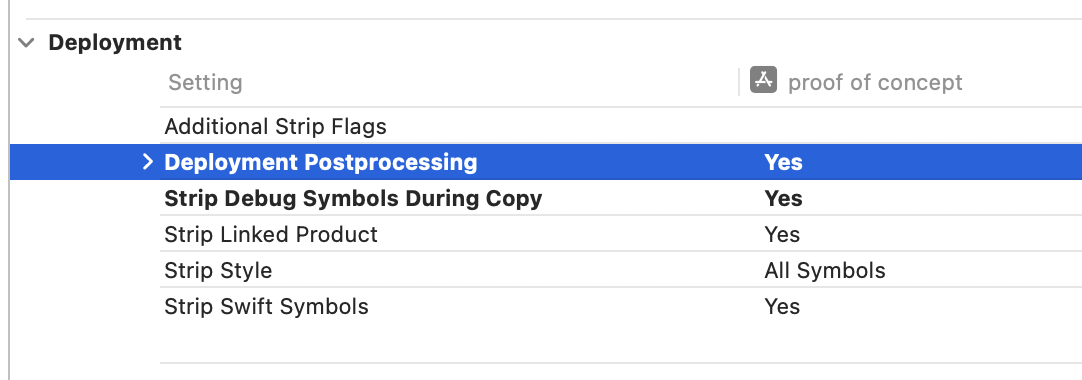 Xcode build settings for stripping symbols
Then I figured, if assertions are the root cause of this, why don’t we just remove them from the program? This answer suggests that this can be done by defining NDEBUG and NS_BLOCK_ASSERTIONS, but after playing around with it, turns out those options don’t apply if your program is written in Swift.
Apparently, Swift is different and decides to strip assertions during compilation based on code optimisation level. After setting it, I stopped seeing my machine’s path in the binary! :D
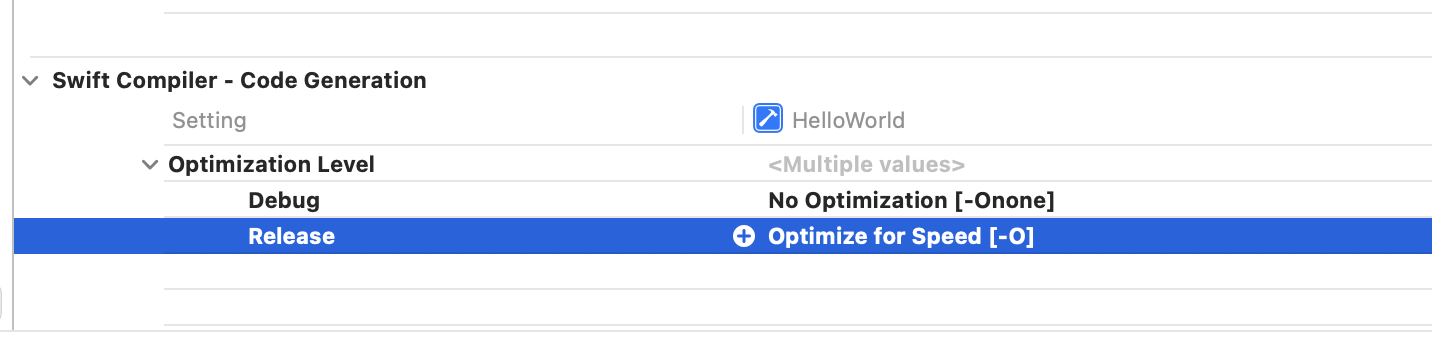 Xcode Swift code optimisation level options
1
2
benkyou@benkyous-MacBook-Air HelloWorld 2026-04-19 23-30-39 % r2 -qc izz~/Users HelloWorld.app/Contents/MacOS/HelloWorld
WARN: Relocs has not been applied. Please use `-e bin.relocs.apply=true` or `-e bin.cache=true` next time
Code optimisation is enabled by default (-O) for release builds so I’m guessing the developer of the app changed it themselves during testing and forgot to turn it back on before releasing it.